 Help Center
Release includes 2024.3.1 and 2023.1.9
Easier access to help and e-learning
You can now use your Symetri account to access Naviate Help and E-learning in Pinnacle; less need for signing in.
First time you access Help or E-learning from any Naviate application you will be asked to login using your Symetri SSO credentials and to authorize Pinnacle to your Symetri account.
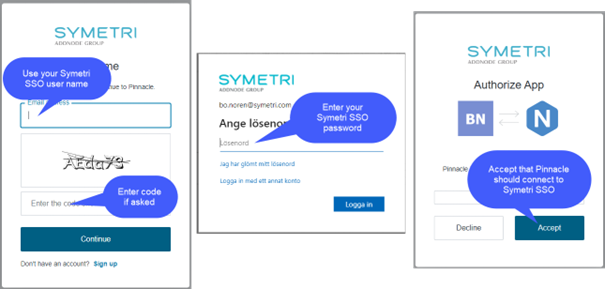
Now a Pinnacle account is created if you belong to a company with Naviate licenses. From now on your Pinnacle account will automatically be used every time you access Help or E-learning from any Naviate application if you have a Naviate license connected to your Symetri account.
Dark Theme
Only in 2024.3.1
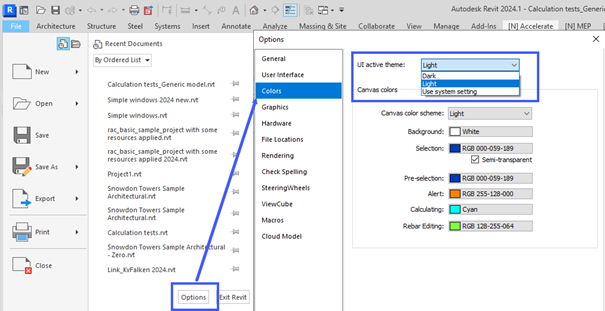
Added Support for Revit Dark Theme to all Naviate products.

All Ribbons in Naviate applications now follow UI active theme setting in Revit. You can switch between active theme in Revit Options dialog box -> Colors.
IFC Mode
Only in 2023.1.9
New feature which supports selecting walls & openings and creating compartments from IFCs exports from ArchiCAD. Enabling data transfer from IFC model to ArchiCAD model.
By turning on the IFC mode in the ribbon you will enable BIM Fire tools to work with IFC exports.

Main Features
- Create Wall compartments from IFC exports
- Create Opening compartments from IFC exports
- Connect symbols to elements from IFC exports
- Check changes made to connected underlying elements in the linked IFC
- Check that all requirements are connected to the correct object in IFC