Help Center
Changes are available in Naviate for Civil 3D 2025.2, 2024.12, 2023.22 releases.
Line Set
Line Set command has been reworked to support creating multiple surfaces inside one Line Set and also to create solids from the line set. Several components have been updated with more options.
Slope Arrow
A new set of commands for creating elevation points and slope arrows and automatically adding them to a surface. Single and Continous Slope Arrows creates objects starting from a set point or an existing point. With Interpolate Slope Arrow, up to three existing objects can be used to create a plane for the new slope arrow.
3D Measure
3D Measure can now import a Property Set along with a template if that property set is named the same as the template. The Property Set can be placed in the same folder as the template or in the Naviate Support folder for Property Sets.
3D Measure and Add Properties to Point
3D Measure and Add Properties to Point have been updated to support a workflow to add 3D-texts with stationing along a feature line.
Object Style
Object Style – now has Apply Properties which applies Layer, Color, Linetype, Lineweight, Size, Text Style Scale (for Block) and Content (optional for text) on an existing text or block.
Piles and Sheet Piles
The Piles and Sheet Piles commands can be used with a Naviate Landscape license.
Object Style Library
Object Style Library now has a right-click menu for Create and Apply properties.
Line Style Library
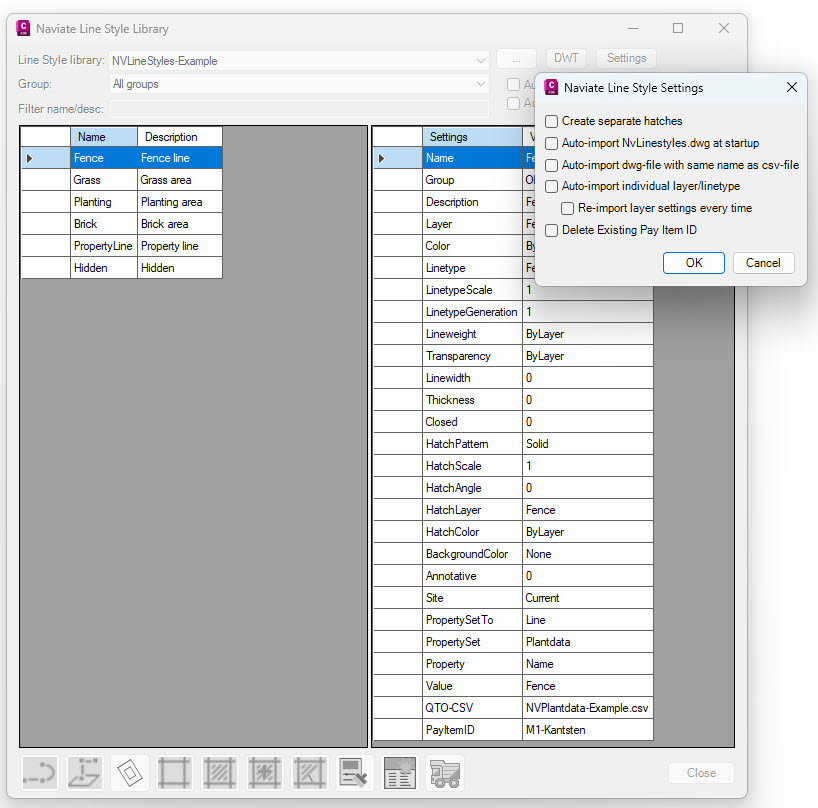
Line Style Library now has multiple options for importing from a template. In the Settings-dialog, Layers and Linestyles can be imported from a NvLinestyles.dwg every time the command starts, or a specific template to the selected Line Style List can be used. The command can also import Layers and Line Styles as they are required.